Database workspace tour

Tools for everyday database work

Community includes the workbench tools you reach for daily: editing SQL, browsing grids, transferring data, managing tasks, and asking AI for help. This tour maps Community Edition 26.1.5 before you download DBeaver.

01 · Query surface

SQL Editor

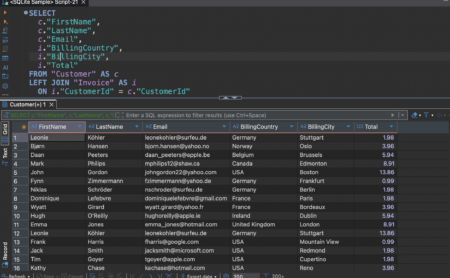
Organize scripts in folders, bind them to a connection, and run the selection with toolbar actions or Ctrl+Enter. Dialect-aware highlighting and result tabs stay beside the editor so you can compare queries without leaving the workbench.
Guide: first query checklist →

SQL Editor · sample query
DBeaver SQL Editor dark theme with SELECT JOIN query and Customer result grid
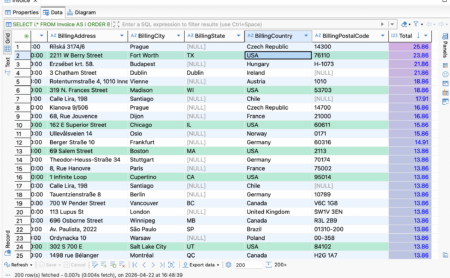
Data Editor · light grid
DBeaver Data Editor light theme showing spreadsheet-style table rows

02 · Row work

Data Editor

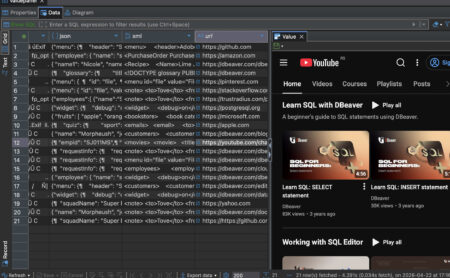
Edit table data like a spreadsheet with Grid, Text, and Record views plus SQL expression filters. The Value panel can preview content such as read-only HTML for text/html cells.

Download Community 26.1.5 →

03 · Schema view

ER diagrams

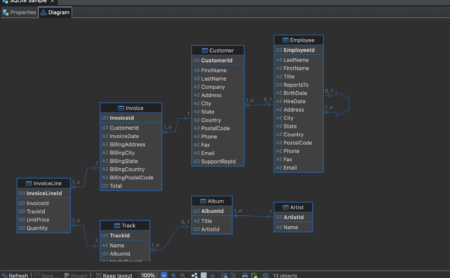
Visualize schemas and foreign keys to understand relationships without dumping DDL first. Column type glyphs and foreign-key lines make structure reviewable for teammates who prefer diagrams over scripts.

Guide: reading foreign keys →

ER Diagram
DBeaver ER diagram of database tables
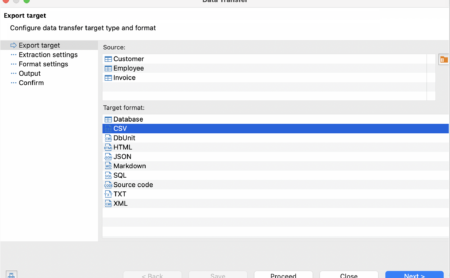
Data Transfer wizard
DBeaver data export and transfer dialog with format and target options

04 · Move data

Data transfer

Import and export with table mapping, saved tasks, and repeatable transfer jobs. Use transfer when you need repeatable CSV or cross-table moves instead of one-off copy/paste from the grid.

Release notes →

operations · tasks

05 · Operations

Task management

Keep maintenance and transfer work organized inside the desktop client. Save repeatable jobs such as imports so mappings survive updates, alongside navigator and maintenance utilities.

Navigator

Tree of connections, schemas, tables, views, and indexes with context actions.

Maintenance

Community includes database maintenance utilities alongside navigator actions.

Install and troubleshooting guides →

06 · Assistance

AI Chat and @ai

Community includes AI Chat and the @ai command for SQL assistance inside the product. Pair suggestions with the Value panel and Data Editor when you need to verify what a generated query actually returns.

ai · profile

@ai explain this join · then run selection in SQL Editor

FAQ on Community capabilities →

Value panel · dark
DBeaver Value panel in dark theme inspecting a selected cell

Compatibility

Database support matrix

Community is built for relational JDBC sources. Driver lists evolve; 26.1.5 adds a GreptimeDB entry using a MySQL-compatible protocol and LibSQL view support.

Category Examples Community Notes
Popular SQL MySQL, MariaDB, PostgreSQL, SQLite, SQL Server Supported Core daily drivers
Cloud / analytic SQL Redshift, BigQuery, Snowflake, Athena, Databricks Driver entries JDBC path; auth varies
Apache / lake SQL Hive, Drill, Presto, Trino, Doris, StarRocks Driver entries SHOW CREATE handling updated for StarRocks/Doris
Embedded / specialty H2, Derby, Firebird, DuckDB, LibSQL, GreptimeDB Driver entries GreptimeDB added in 26.1.5
Non-relational / NoSQL suites MongoDB, Cassandra, Redis, and similar Not the Community focus Softonic notes limited non-relational coverage; broader support is positioned on PRO

Download 26.1.5 Troubleshooting guides

Continue

Related DBeaver pages

Download Community 26.1.5

Windows, macOS, and Linux packages with changelog and integrity notes.

Fix install problems

Java, SmartScreen, antivirus, upgrades, and connection checks.

DBeaver FAQ

License, platforms, Java, safety, and edition boundaries.

Also read trust and security. Last reviewed: .

Download