
База знаний

Устранение неполадок и руководства

DBeaver troubleshooting guides for Community download and install issues: connections, Windows SmartScreen, Java 25, upgrades, Defender checks, and antivirus false positives. Jump the index, then return to download DBeaver 26.1.5 or the FAQ when you need a short answer.

Чеклист первого запроса

A short path from install to a successful SELECT.

  1. Install Community 26.1.5 with the installer for your OS (prefer exe/DMG/deb over overwriting a ZIP tree).
  2. Create a connection in Database Navigator and test credentials.
  3. Open SQL Editor, write a limited SELECT, run the selection with Ctrl+Enter.
  4. Confirm rows in the result grid and note the status bar fetch timing.
SELECT c."FirstName", c."LastName" FROM "Customer" c LIMIT 20;
Не удаётся подключиться to the database

Предупреждение
Connection fails or hangs before the navigator shows schemas.
Причина
Wrong host/port, driver mismatch, firewall, missing SSH tunnel parameters, or incomplete custom auth on imported CSV/XML connections.
Исправление
  1. Re-open connection settings and confirm driver, host, port, database, and user.
  2. Use Test connection before saving.
  3. If you use SSH, set required database parameters before testing the tunnel (Firebird-related tunnel testing was fixed when parameters were missing).
  4. On Linux browser-based auth, ensure a supported browse action exists for the desktop.
Проверка
Navigator expands schemas and a trivial query returns rows.

Windows SmartScreen блокирует запуск

Предупреждение
Windows reports an unrecognized app and refuses to start dbeaver.exe.
Причина
Reputation delay on new builds, or historically an unsigned executable inside a ZIP package.
Исправление
  1. Prefer the Windows installer build over ZIP when possible.
  2. In SmartScreen, open More info, then Run anyway only if you trust the package source and version.
  3. Confirm the version string matches 26.1.5 after launch.
Проверка
Application window opens and Help shows Community 26.1.5.

Antivirus false positives

Предупреждение
AV or browser advisors quarantine the installer or dbeaver.exe.
Причина
Heuristic engines sometimes flag Java desktop apps or freshly published binaries. Community history includes single-engine VirusTotal hits that cleared on rescan.
Исправление
  1. Re-download and compare checksums when published.
  2. Submit the file to your AV vendor or wait for signature updates.
  3. Do not disable AV globally; scope an exception only to the verified install path if policy allows.
Проверка
Clean scan on the same digest, then successful launch.

More on trust and provenance

Java requirements and the jre folder

Причина
DBeaver needs Java 25 or higher. Older system JDKs fail to start the workbench.
Исправление
  1. Use the official package that bundles OpenJDK 25 (standard since 23.0).
  2. To force a local JDK, delete the jre directory inside the install folder and point the environment at Java 25+.
Проверка
About dialog loads without JVM version errors.

Upgrading without losing connections

  1. Run the new Windows installer, or install the new deb/rpm/DMG package.
  2. If you use ZIP, extract to a new directory. Do not unzip over the previous tree.
  3. Start DBeaver and confirm connections still appear.

Settings remain in the user DBeaverData folder. Removing the old application directory does not remove that data.

Microsoft Проверка исключений Defender on startup

Предупреждение
Startup shows a Проверка исключений Defender error on Eclipse-based builds.
Исправление
  1. Open Window → Preferences → General → Startup and Shutdown.
  2. Enable skip for Microsoft Проверка исключений Defender when your policy allows.
  3. Alternatively create .eclipse/.settings/org.eclipse.ui.prefs with:
eclipse.preferences.version=1 windows.defender.startup.check.skip=true
Проверка
Restart completes without the exclusion error dialog.

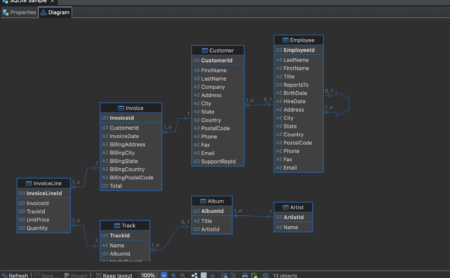
Чтение внешних ключей on an ER diagram

When a relationship line is selected, the status area can show the constraint name such as fk_payment_customer. Use diagrams to confirm cardinality before writing joins.

ER Diagram · relationship detail
DBeaver dark ER diagram with foreign key relationship lines between tables

Лучшие практики

  • Keep result fetch limits modest on large tables to avoid UI slowdowns noted by Softonic-style heavy-grid feedback.
  • Store production credentials in OS secret stores or connection auth flows; avoid sharing screenshots that include secrets.
  • Use saved data-transfer tasks for repeatable imports so mappings survive updates.
  • After each Community minor, skim the release notes for driver-specific fixes that affect your engines.

Скачать 26.1.5 FAQ

Продолжить

Связанные страницы

Скачать Community 26.1.5

Windows, macOS, and Linux packages with changelog and integrity notes.

Возможности DBeaver

SQL Editor, Data Editor, ER diagrams, transfer, and AI Chat.

Решить проблемы установки

Java, SmartScreen, antivirus, upgrades, and connection checks.

Also read the FAQ DBeaver and trust and security pages. Last reviewed: .

Скачать